

Lista DAO is thrilled to announce the launch of the Lista Lending Vault Manager GUI, a user-friendly interface for creating and managing custom vaults on our lending protocol.
This upgrade marks a significant milestone in making Lista Lending more accessible and flexible for curators, partners, and advanced DeFi users.
In this article, we’ll dive into the details of this exciting update and provide a step-by-step guide on how you can create your own vault using the new Vault Manager function.
Introducing the Lista Lending Vault GUI
The Lista Lending Vault GUI is a powerful addition to our protocol, designed to meet the growing demand for customizable vaults as our ecosystem expands with new partners and use cases.
Built on the secure foundation of Lista Lending, the Vault GUI enables experienced DeFi users to create and manage vaults tailored to their specific strategies. Whether you’re a curator optimizing yields, a partner integrating assets, or a power user seeking advanced control, this interface streamlines the process with intuitive design and robust functionality.
Key Features of the Vault GUI (V1.1)
The Vault Manager V1.1 introduces a suite of core functions to enhance user experience and vault management:
-
Vault Creation: Easily set up new vaults with customizable parameters like vault name, asset, timelock, and owner address.
-
Role Management: Assign and modify roles (Owner, Curator, Guardian, Allocator) to ensure secure and efficient vault operations.
-
Parameter Settings: Fine-tune vault settings, including performance fees (up to 50%), fee recipient, and timelock duration (up to 14 days).
-
Vault–Market Management: Connect vaults to specific Lista Lending markets and manage supply caps for optimized liquidity.
-
Vault Dashboard: Monitor key metrics like Total Value Locked (TVL), vault address, and performance fees at a glance.
Why This Matters
The Vault GUI addresses the increasing need for scalable vault creation as Lista DAO grows its partnerships and user base. By providing a dedicated interface, we’re empowering our community to:
-
Customize DeFi Strategies: Create vaults tailored to specific assets and market conditions, maximizing yield opportunities.
-
Enhance Security: Leverage timelock mechanisms and role-based access to protect vault operations.
-
Streamline Management: Access all vault-related functions in a single, desktop-optimized interface.
This launch builds on Lista Lending’s commitment to security, with features like multi-oracle pricing and whitelist-based liquidations, ensuring that vault curators operate in a safe and reliable environment.
How Lista Lending’s Vault Manager GUI Differs from Others
While other platforms provide vault management tools, Lista Lending’s Vault Manager GUI offers a uniquely flexible and customizable framework, prioritizing granular control, transparency, and operational efficiency.
Distinct Role Management
Unlike previous designs, which does not mandate predefined role assignments for vault operations, Lista Lending’s Vault Manager GUI introduces a structured governance model with three distinct roles:
-
Proposer: Initiates vault actions, such as configuration changes or strategy proposals.
-
Executor: Executes approved proposals after the mandatory timelock period.
-
Canceller: Holds the authority to cancel proposals at any stage, ensuring robust oversight.
These roles are manually assigned within the GUI, allowing for precise control and a clear separation of duties. Notably, all three roles can be assigned to a single address, and there are no restrictions on the number of role holders, providing unmatched flexibility.
Enhanced Timelock Integration
Lista Lending’s timelock mechanism operates externally to the smart contract, requiring active management through the Vault Manager GUI. Every critical operation initiated by the Proposer undergoes a 1-day timelock before the Executor can act. The Canceller can intervene at any point to halt a proposal, adding an extra layer of security.
In contrast, earlier designs that came before Lista DAO embeds its timelock within the smart contract. While this streamlines operations, it sacrifices the flexibility and oversight that Lista’s external timelock system provides, enabling more deliberate and secure governance.
Manager vs. Allocator Dynamics
Lista Lending distinguishes between Managers (or Curators) and Allocators to optimize vault operations. Managers’ actions, such as strategic adjustments, are subject to the timelock system, ensuring thorough review and governance. Allocators, however, can perform specific tasks — like real-time liquidity management or vault behavior adjustments — without timelock delays, enabling swift responses to market conditions.
This dual structure balances security with efficiency, granting builders and curators greater autonomy while maintaining transparency and accountability.
User Guide: How to Create Your Own Vault
Ready to dive in and create your own vault? Follow this step-by-step guide to set up a vault using the Lista Lending Vault Manager.
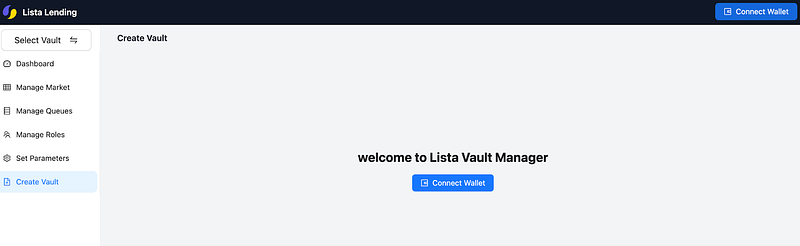
Step 1: Access the Vault Manager
-
Navigate to https://manager.lista.org/ on a desktop browser.
-
Connect your wallet (e.g., MetaMask) by clicking the wallet connection button. Ensure your wallet is set to BNB Smart Chain.
Step 2: Create a New Vault
-
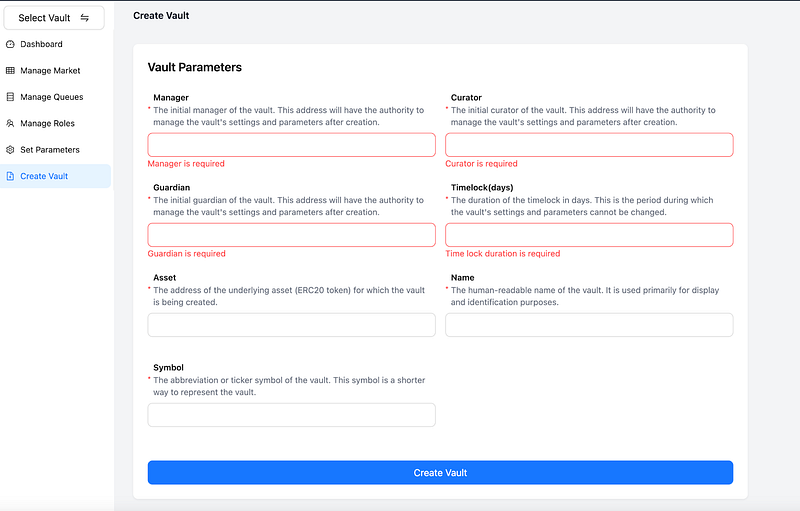
From the Vault Manager homepage, click “Create Vault” to navigate to the vault-creation page.
-
Fill in the core parameters:
-
Manager
-
Curator
-
Guardian
-
Timelock (days)
-
Asset Contract Address
-
Vault Name
-
Vault Symbol
Step 3: Explore the Vault Dashboard
-
The dashboard displays:
-
Vault Name
-
Vault Address
-
TVL
-
Core Parameters: Performance Fee, Fee Recipient, Timelock
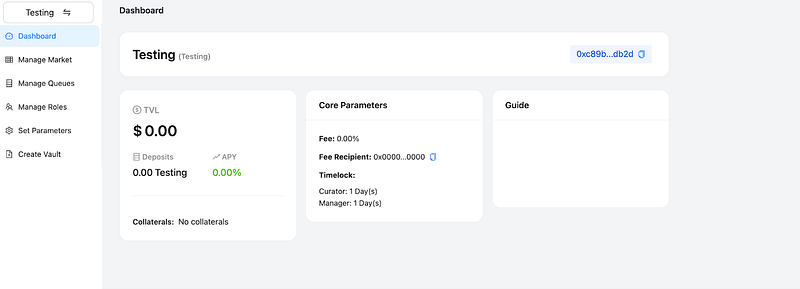
2. Click on Core Parameters to adjust your vault settings
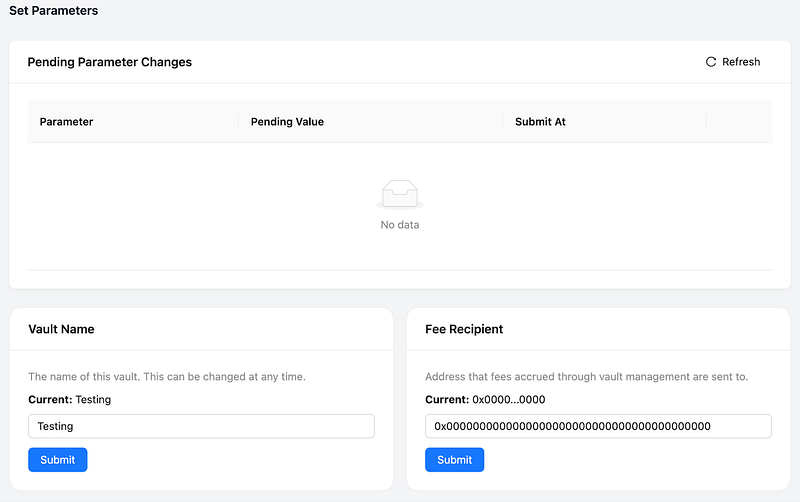
3. Use the dashboard to:
-
Manage roles (e.g., assign Curators or Allocators).
-
Adjust timelock settings.
-
Monitor vault performance.
Step 4: Market Management
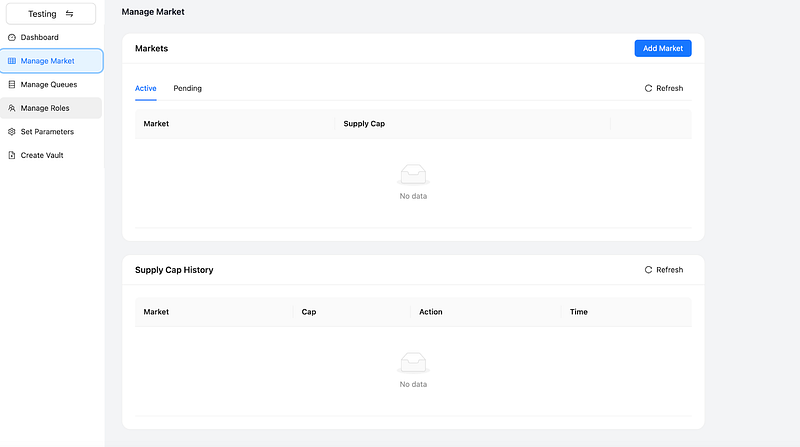
-
Add markets by searching for Market ID or collateral name, ensuring they match your vault’s asset.
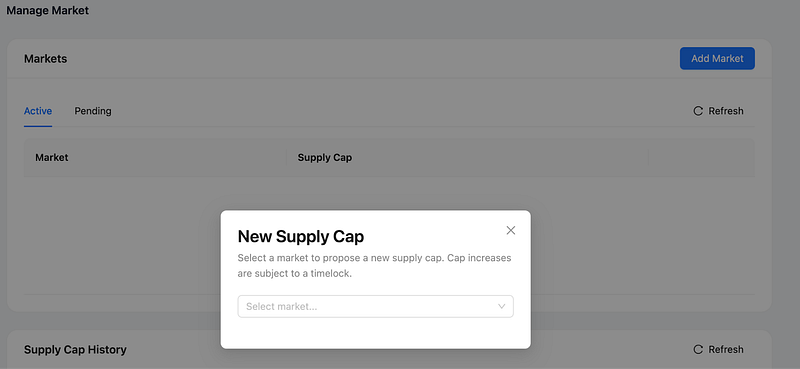
2. Set market caps and approve or reject pending markets.
Conclusion
The Lista Lending Vault GUI empowers our community to shape the future of DeFi with custom vaults that optimize yields and security. We invite experienced DeFi users to explore Lista DAO’s vault manager; to create their first vault, and share feedback with us.