Secure, simple, and permissionless DeFi solutions at https://lista.org/

Share Dialog
Share Dialog
Secure, simple, and permissionless DeFi solutions at https://lista.org/

Subscribe to Lista DAO

Subscribe to Lista DAO
>300 subscribers
>300 subscribers
Lista.org is a platform that allows users to engage with decentralized applications and manage digital assets seamlessly. Connecting a Binance Wallet to Lista ensures secure transactions and easy access to the platform’s features, not to mention added benefits like Binance Launchpool rewards via minting slisBNBx and eligibility for Lista Credit, the world's first on-chain credit loan. Here’s a step-by-step guide to get started.
If you don’t already have a Binance Wallet, start by creating one. You must first pass Binance's Know-Your-Customer (KYC) verification before you can set up a wallet. Refer to this video guide for a complete guide to setting up your Binance Wallet:
You can also access Binance Wallet from your browser by downloading it here or on your selected browser's extension store.
Visit Lista.org on mobile or desktop.
Navigate to the wallet section or look for the “Connect Wallet” button.
Select “Binance Wallet” from the list of supported wallets.
A pop-up will appear from the Binance Wallet interface asking you to approve the connection. Confirm the connection.
Here's a quick guide on setting up your Binance Wallet and using it on your browser to visit lista.org:
Once your wallet is connected, you can start staking, lending, borrowing, and other activities at Lista.
Using a Binance MPC Wallet may potentially give you access to Lista Credit, the world's first on-chain credit loan without collateral requirement. Our whitelist is updated on a monthly basis so remember to check your wallet every now and then.
If you deposit your slisBNB as collateral or into Smart Lending, you will be able to mint slisBNBx and receive Binance Launchpool rewards.
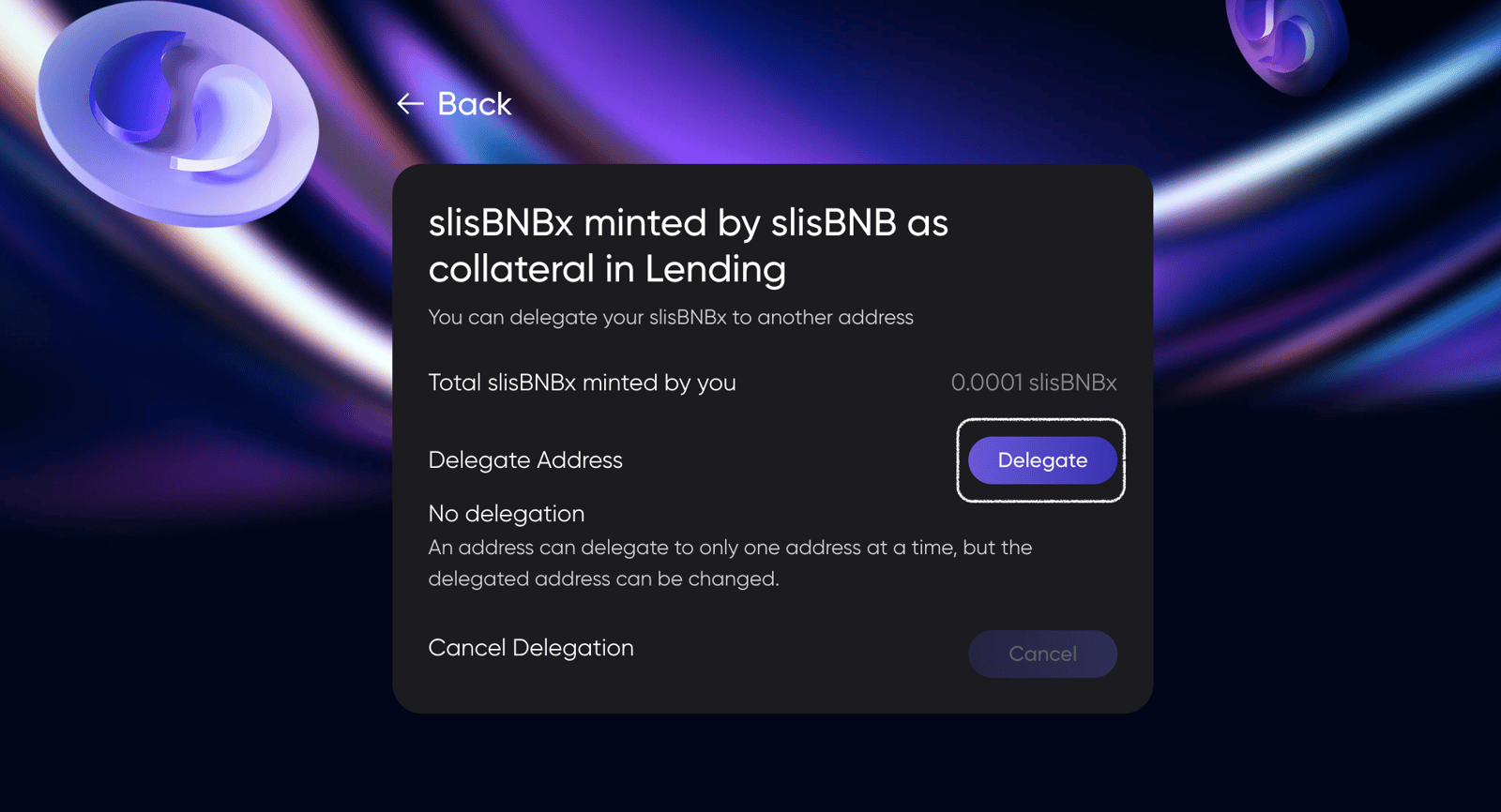
slisBNBx must be delegated to a Binance MPC Wallet address. Visit this link, select 'Delegate', and fill in your Binance MPC Wallet address:
Always double-check the URLs you are interacting with to avoid phishing sites.
Confirm transactions carefully; blockchain transactions are irreversible.
Keep your wallet software updated to the latest version for security patches and feature improvements.
By following these steps, your Binance Wallet is ready to interact with Lista.org. With practice, managing assets on Lista through Binance Wallet becomes intuitive and straightforward. If your accumulated a sizable portfolio and enough activities at Lista, you will get a chance to be whitelisted by Lista Credit.
Lista.org is a platform that allows users to engage with decentralized applications and manage digital assets seamlessly. Connecting a Binance Wallet to Lista ensures secure transactions and easy access to the platform’s features, not to mention added benefits like Binance Launchpool rewards via minting slisBNBx and eligibility for Lista Credit, the world's first on-chain credit loan. Here’s a step-by-step guide to get started.
If you don’t already have a Binance Wallet, start by creating one. You must first pass Binance's Know-Your-Customer (KYC) verification before you can set up a wallet. Refer to this video guide for a complete guide to setting up your Binance Wallet:
You can also access Binance Wallet from your browser by downloading it here or on your selected browser's extension store.
Visit Lista.org on mobile or desktop.
Navigate to the wallet section or look for the “Connect Wallet” button.
Select “Binance Wallet” from the list of supported wallets.
A pop-up will appear from the Binance Wallet interface asking you to approve the connection. Confirm the connection.
Here's a quick guide on setting up your Binance Wallet and using it on your browser to visit lista.org:
Once your wallet is connected, you can start staking, lending, borrowing, and other activities at Lista.
Using a Binance MPC Wallet may potentially give you access to Lista Credit, the world's first on-chain credit loan without collateral requirement. Our whitelist is updated on a monthly basis so remember to check your wallet every now and then.
If you deposit your slisBNB as collateral or into Smart Lending, you will be able to mint slisBNBx and receive Binance Launchpool rewards.
slisBNBx must be delegated to a Binance MPC Wallet address. Visit this link, select 'Delegate', and fill in your Binance MPC Wallet address:

Always double-check the URLs you are interacting with to avoid phishing sites.
Confirm transactions carefully; blockchain transactions are irreversible.
Keep your wallet software updated to the latest version for security patches and feature improvements.
By following these steps, your Binance Wallet is ready to interact with Lista.org. With practice, managing assets on Lista through Binance Wallet becomes intuitive and straightforward. If your accumulated a sizable portfolio and enough activities at Lista, you will get a chance to be whitelisted by Lista Credit.
Lista DAO
Lista DAO
No activity yet